
Scope
This transaction is used by the Requesting GTK to retrieve metadata. The Requesting GTK sends this request to all Responding GTK’s where information is available. Prior to this transaction the Requesting GTK first needs to retrieve information about where metadata can be retrieved. This is needed to prevent excessive usage of the transaction to GTK’s where no information is available.
The Mitz open question specifications can be found on their website: Bijlage | Architectuurdocumenten
Use Case Roles
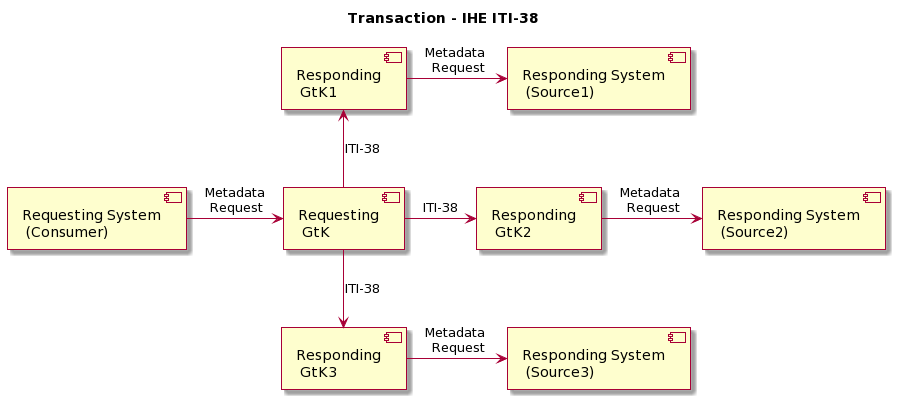
This transaction uses SOAP v1.2 and Synchronous Web Services.
Referenced standards
Implementers of this transaction shall comply with all requirements described in Web Services for IHE Transactions.
|
ebRIM |
OASIS/ebXML Registry Information Model v3.0 |
|
ebRS |
OASIS/ebXML Registry Services Specifications v3.0 |
|
ITI TF-3:4 |
Metadata used in Document Sharing profiles |
Messages
Cross Gateway Query
For more technical specification, see the original document: https://profiles.ihe.net/ITI/TF/Volume2/ITI-38.html
The ITI-38 transaction supports the optional $targetCommunityIdList parameter allowing an Initiating Gateway actor to request a response from one or more "home communities" that are served by the Responding Gateway actor. The follow behavior is expected
|
$targetCommunityIdList |
Expected behavior |
|
Not included |
Backward compatibility use-case. The responding gateway is expected to return the same response as if no $targetCommunityIdlist was included in the request. |
|
Empty |
The Responding gateway respond with an error. |
|
Includes homeCommunityIds that are not known to the Responding Gateway |
Responding returns a partial success response indicating which homeCommunityIds were not recognized. The Initiating gateway should not treat this as an error. |
|
Includes homeCommunityIds that are known to the Responding Gateway |
Responding returns a success response. |
NB: This transaction is always performed in combination with the transaction ITI-40 where user data is added in a SAML token.
NB: All transactions are logged with an ITI-20 audit transaction, see IHE:ITI volume 2 for the correct implementation.”